
Установить приложение
Как установить приложение на iOS
Посмотрите видео ниже, чтобы узнать, как установить наш сайт в виде веб-приложения на главном экране.
Примечание: Эта функция может быть недоступна в некоторых браузерах.
Вы используете устаревший браузер. Этот и другие сайты могут отображаться в нём некорректно.
Вам необходимо обновить браузер или попробовать использовать другой.
Вам необходимо обновить браузер или попробовать использовать другой.
L2.EXE Updater
- Автор темы Luan
- Дата начала
Дополнительные настройки
Кто ответил?


Yes, Its Full source.Спасибо
Изображения менять можно лаунчера?

суперIf I’m in the wrong area or have spelling mistakes, sorry.
This L2.EXE was made in Python, based on the L2.EXE in C posted on GitHub.
What does it do?
It checks files inside and outside the system.
SHA1 verification.
Downloads and launches Lineage 2.
You can use it as a Launcher or even an L2.EXE.
It’s functional but can definitely be improved.
It was made using GPT and Grok.
Python used:
Python 3.12.8
You can use the requirements.txt to install the necessary things, if something is missing, google it =D
Посмотреть вложение 87598
*** Скрытый текст не может быть процитирован. ***
*** Скрытый текст не может быть процитирован. ***
Edit*
In config.json is where you can edit some things.
the url for the json file is in
"update_json_url":
JSON exampleJSON:{ "ip": "YOUR_IP_SERVER_DONT_NEED_L2INI", "system_paths": [ "System_en", "System_ru", "System" ], "external_paths": [ "SysTextures", "Textures", "L2text", "Maps", "Sounds", "music", "StaticMeshes", "L2text_classic", "Animations" ], "files": [ { "fileName": "System_en\\l2.bin", "SHA1": "4df67848a41fffc7d12d3cbaf053dad17bf9f986", "URL_LINK": "YOUR_URL_TO_FILE/L2.bin" }, { "fileName": "System_en\\l2.ini", "SHA1": "a04dee57b3d9abb1c9d84c427832fc94acfe344c", "URL_LINK": "YOUR_URL_TO_FILE/L2.ini" }, { "fileName": "System_en\\Interface.u", "SHA1": "d869473736a7be73328771c38e984e84071368db", "URL_LINK": "YOUR_URL_TO_FILE/Interface.u" }, { "fileName": "System_en\\Interface.xdat", "SHA1": "94c08864ebbe173c019481c04a7f392670667059", "URL_LINK": "YOUR_URL_TO_FILE/Interface.xdat" }, { "fileName": "System_en\\InterfaceClassic.u", "SHA1": "853a2c16e3bf2bcafb1dfcdb1999743ff670b096", "URL_LINK": "YOUR_URL_TO_FILE/Interface.u" }, { "fileName": "System_en\\InterfaceClassic.xdat", "SHA1": "567c8e0092fd30089971c104d73c745d43c05c69", "URL_LINK": "YOUR_URL_TO_FILE/InterfaceClassic.xdat" } ], "full_system_url": "YOUR_FULL_URL_JSON" }
========== UPDATE POST =============
Config.json editor.
To help configure it, move the image, some texts, etc.
Needs improvements.
Посмотреть вложение 87618
*** Скрытый текст не может быть процитирован. ***
================ PATCH EDITOR ===============
Посмотреть вложение 87619
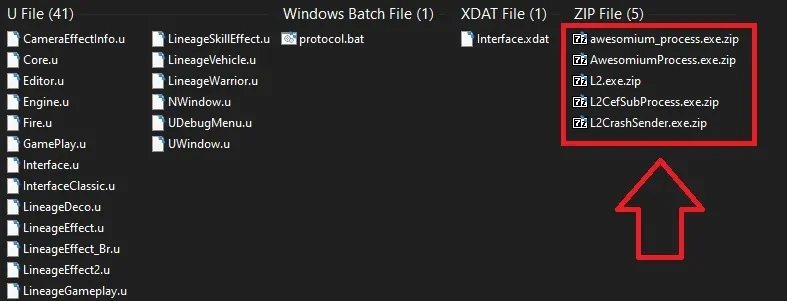
Place your files inside their respective folders System, Systextures etc...
Click on Gerar sem Compactar (without compressing files) or
Gerar Compactado com Zips) (To generate compressed with Zip)
There is an option for those who use Cloudflare R2 (buckets) to just remove the selected box.
*** Скрытый текст не может быть процитирован. ***


Отличная работа!



yes, If you don't know how, use some AI to help you.его компилить надо ?


Наконецто беру себе, Отлично)

You need PyInstaller to generate the EXE file.Как правильно скомпилировать в .exe чтоб без питона могли люди пользоватся, с командой auto-py-to-exe не смог правильно скомпилировать, с питона да работает, но это не то ....
example
pyinstaller --noconfirm --onefile --name="l2" --noconsole --icon="resources/icons/l2.ico" --add-data="config.json;." --add-data="resources/images/spl1.png;resources/images" --add-data="resources/images/close.png;resources/images" --upx-dir="YOUR_FOLDER_FOR_UPX_CHANGE_THIS\L2EXE_py\upx" main.py

Thanks, all compiled properly and works. but not unzip update filespyinstaller --noconfirm --onefile --name="l2" --noconsole --icon="resources/icons/l2.ico" --add-data="config.json;." --add-data="resources/images/spl1.png;resources/images" --add-data="resources/images/close.png;resources/images" --upx-dir="YOUR_FOLDER_FOR_UPX_CHANGE_THIS\L2EXE_py\upx" main.py

Вложения


goodIf I’m in the wrong area or have spelling mistakes, sorry.
This L2.EXE was made in Python, based on the L2.EXE in C posted on GitHub.
What does it do?
It checks files inside and outside the system.
SHA1 verification.
Downloads and launches Lineage 2.
You can use it as a Launcher or even an L2.EXE.
It’s functional but can definitely be improved.
It was made using GPT and Grok.
Python used:
Python 3.12.8
You can use the requirements.txt to install the necessary things, if something is missing, google it =D
Посмотреть вложение 87598
*** Hidden text: cannot be quoted. ***
*** Hidden text: cannot be quoted. ***
Edit*
In config.json is where you can edit some things.
the url for the json file is in
"update_json_url":
JSON exampleJSON:{ "ip": "YOUR_IP_SERVER_DONT_NEED_L2INI", "system_paths": [ "System_en", "System_ru", "System" ], "external_paths": [ "SysTextures", "Textures", "L2text", "Maps", "Sounds", "music", "StaticMeshes", "L2text_classic", "Animations" ], "files": [ { "fileName": "System_en\\l2.bin", "SHA1": "4df67848a41fffc7d12d3cbaf053dad17bf9f986", "URL_LINK": "YOUR_URL_TO_FILE/L2.bin" }, { "fileName": "System_en\\l2.ini", "SHA1": "a04dee57b3d9abb1c9d84c427832fc94acfe344c", "URL_LINK": "YOUR_URL_TO_FILE/L2.ini" }, { "fileName": "System_en\\Interface.u", "SHA1": "d869473736a7be73328771c38e984e84071368db", "URL_LINK": "YOUR_URL_TO_FILE/Interface.u" }, { "fileName": "System_en\\Interface.xdat", "SHA1": "94c08864ebbe173c019481c04a7f392670667059", "URL_LINK": "YOUR_URL_TO_FILE/Interface.xdat" }, { "fileName": "System_en\\InterfaceClassic.u", "SHA1": "853a2c16e3bf2bcafb1dfcdb1999743ff670b096", "URL_LINK": "YOUR_URL_TO_FILE/Interface.u" }, { "fileName": "System_en\\InterfaceClassic.xdat", "SHA1": "567c8e0092fd30089971c104d73c745d43c05c69", "URL_LINK": "YOUR_URL_TO_FILE/InterfaceClassic.xdat" } ], "full_system_url": "YOUR_FULL_URL_JSON" }
========== UPDATE POST =============
Config.json editor.
To help configure it, move the image, some texts, etc.
Needs improvements.
Посмотреть вложение 87618
*** Hidden text: cannot be quoted. ***
================ PATCH EDITOR ===============
Посмотреть вложение 87619
Place your files inside their respective folders System, Systextures etc...
Click on Gerar sem Compactar (without compressing files) or
Gerar Compactado com Zips) (To generate compressed with Zip)
There is an option for those who use Cloudflare R2 (buckets) to just remove the selected box.
*** Hidden text: cannot be quoted. ***


